How to Replace a Broken Diaphragm in an Orbit Sprinkler
Lead Turfgrass & Lawn Care Specialist at Totally Green Lawn · Certified Turfgrass Specialist (CTS), Master Gardener, B.S. in Agronomy & Turf Science · 14+ years in residential turf management, organic fertilization, and weed science
How to replace a broken diaphragm in an orbit sprinkler valve comes down to about ten straightforward steps once you've killed the water and confirmed the diaphragm (not the solenoid) is the culprit. Most homeowners finish the job in 15 to 30 minutes, and a genuine Orbit repair kit runs roughly $5 to $12 at most home improvement retailers as of 2026. If your zone won't shut off, your valve is leaking around the bonnet, or water is seeping from the solenoid, the diaphragm is almost always the part to blame.
The catch is that Orbit makes several valve families, and the diaphragms are not interchangeable. The 570/580 series and the 2600 series use different kits, so identifying your model first saves you a second trip to the store. Manufacturer specifications indicate these valves are rated for 15 to 150 PSI operating pressure on standard 24V AC residential systems, which means the parts take real abuse from pressure cycles and mineral-heavy water.
Before you dig in, let's make sure you know what you're looking for.
Quick Answer
Shut off the irrigation main water supply. Unscrew the solenoid, remove the four bonnet screws, and lift off the bonnet. Take out the old diaphragm and spring, clean the seat, and drop in the new diaphragm with the spring seated.
Reassemble, restore pressure, and test the zone manually and on the timer.
How to Tell If Your Orbit Valve Needs a New Diaphragm (Not a Solenoid)
Sprinkler valve problems usually show up in one of three ways: the zone won't turn on, the zone won't shut off, or the valve leaks from the body. The trick is matching the symptom to the right part so you don't waste a repair kit.
The three most common failure signs
- Zone stuck on (water runs even when the timer is off): The diaphragm's small bleed hole is usually clogged with debris, or the rubber has warped and won't seal against the seat. This is the most common diaphragm failure.
- Leak around the bonnet screws or under the solenoid: The diaphragm has cracked, torn, or lost its seal. Water bypasses the rubber and pushes out wherever it can.
- Zone won't open at all: This is more often a solenoid or wiring issue, but a severely deformed diaphragm can also block water flow. Replace the solenoid first if you're unsure.
Quick field check before you dig
If your valve box is full of water, the leak is almost certainly the diaphragm, not the solenoid. Solenoids fail electrically; diaphragms fail hydraulically. A swampy valve box on a calm day points to rubber.
Per Orbit's installation guidance, you can also twist the solenoid counter-clockwise about a quarter turn while the water is on. If water gushes out, the diaphragm is stuck open. If nothing happens, the solenoid isn't getting power.
When it's not the diaphragm
If your zone won't activate and the solenoid doesn't click when the timer calls for it, check the controller output with a multimeter. You should see roughly 24V AC at the solenoid wires. No voltage means a bad controller, broken wire, or bad splice, not a bad diaphragm.
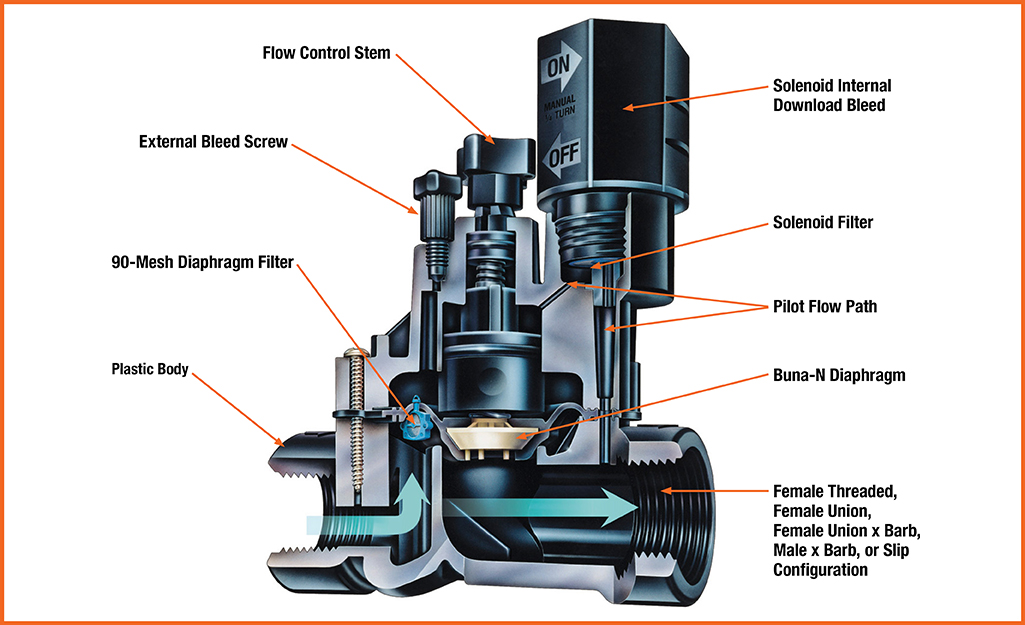
Image source: Bing (Web (fair-use with source credit))
Tools, Parts, and Orbit Repair Kit You Actually Need
You don't need a lot of specialty gear, but having the right kit on hand before you crack the valve open saves a second trip. Most of this stuff is already in a basic homeowner toolbox.
The minimum toolkit
- Phillips head screwdriver (most Orbit bonnets use four Phillips screws)
- Adjustable wrench or pliers (for the solenoid, only if it's stuck)
- Small flathead screwdriver or pick (for prying the old diaphragm out)
- Clean rag and a bucket
- Needle-nose pliers (helpful for the small spring)
Parts to confirm before you start
- Orbit diaphragm repair kit matched to your exact valve model (570/580 series or 2600 series)
- Optional: replacement solenoid O-ring if the old one looks crusty
- Optional: Teflon tape for the solenoid threads if you removed it fully
Quick parts reference
| Item | Typical Use | Approx. Cost (2026) |
|---|---|---|
| Orbit 570/580 repair kit | 570, 571, 572, 573, 574, 575, 576, 580 series valves | $5 to $10 |
| Orbit 2600 series repair kit | 2600, 2610, 2620, 2630 series valves | $6 to $12 |
| Replacement solenoid O-ring | If the old one is flattened or cracked | $1 to $2 |
| New solenoid (if needed) | Only if the original fails the click test | $12 to $20 |
The repair kit is the heart of the job. It includes the diaphragm, the small spring, and sometimes a new bonnet seal. Don't skip the spring; it controls how the diaphragm seats, and reusing an old stretched spring is a common reason the repair "doesn't work."
Step-by-Step: Replacing the Diaphragm in an Orbit Sprinkler Valve
The repair is genuinely simple once you've confirmed the model and killed the water. Take your time with reassembly, and you'll have a working valve in about half an hour.
1. Shut off the water and relieve pressure
Find the irrigation main shutoff, usually near the backflow preventer or the meter. Close it. Then go to the valve you're repairing and manually activate the zone from the timer, or twist the solenoid a quarter turn, to bleed off any pressure in the lines.
You want a depressurized system before you pull the bonnet.
2. Unscrew the solenoid
With the water off and pressure released, unscrew the solenoid by hand, turning it counter-clockwise. Most Orbit solenoids thread out with about one to two full turns. You don't need to fully remove the wires; just lift it high enough to clear the bonnet.
If it's stuck, use an adjustable wrench with a rag to protect the plastic.
3. Remove the four bonnet screws
Set the valve upright. Take out the four Phillips screws around the perimeter of the bonnet. Keep them in a small container so they don't fall into the valve box mud.
4. Lift off the bonnet and remove the old diaphragm
Grip the flow control handle or the body of the valve and lift the bonnet straight up. The diaphragm and spring usually come out with it. If they stay in the body, fish them out with needle-nose pliers.
Inspect the old rubber. Cracks, tears, or a stretched-out shape confirm your diagnosis.
5. Clean the seat and inspect the small port
Wipe the inside of the valve body with a rag. Look for the small hole at the bottom of the diaphragm seat, this is the bleed port that controls the valve's operation. Manufacturer specs confirm this port must be clear of debris or the valve won't shut off.
Use a pin or a thin pick to clear it.
6. Drop in the new diaphragm and spring
Place the spring into the center hole of the new diaphragm. Set the assembly onto the valve body, making sure the rubber seats flat against the body. The orientation matters; the smooth side usually faces up toward the bonnet, and the small center hole lines up over the bleed port.
7. Reinstall the bonnet
Lower the bonnet back over the diaphragm. Press down gently so the rubber seats evenly. Reinsert the four screws and tighten them in a criss-cross pattern.
Snug is enough. Overtightening will crack the plastic body, and that's a valve you can't save.
8. Reattach the solenoid
Thread the solenoid back in by hand, clockwise, until it seats. A quarter to half turn past finger-tight is plenty. Teflon tape isn't usually required, but a wrap on the threads helps if the solenoid has been dripping.
9. Restore pressure and test manually
Slowly open the main shutoff valve. Watch the repaired valve for leaks around the bonnet or solenoid. Then twist the solenoid a quarter turn to manually open the zone.
Water should flow to the sprinklers. Release the solenoid; the zone should shut off cleanly.
10. Test on the timer
Run the zone from the controller. Listen for the solenoid click, watch for the sprinklers to pop up, and confirm everything shuts off when the cycle ends. If the zone sticks on, the bleed port is still clogged or the diaphragm is misaligned.
If it doesn't open at all, recheck the solenoid wiring.

Image source: Web (Bing) / pinterest.com (Web (fair-use with source credit))
Orbit 570/580 vs. 2600 Series: Which Diaphragm Fits Your Valve
This is the single most common point of failure for DIY repairs. The diaphragms look almost identical at a glance, but they don't fit across families. Buying the wrong kit is an easy mistake to make, and it usually means a return trip to the store.
How to identify your valve in 30 seconds
- Look at the body shape. The 570/580 series has a slimmer, taller profile with a rounded bonnet. The 2600 series is wider and more rectangular at the top.
- Read the model number stamped on the side of the valve body, usually near the inlet. It'll say something like "Orbit 571" or "Orbit 2600."
- Check the packaging or your original install docs if you have them.
Side-by-side comparison
| Feature | 570/580 Series | 2600 Series |
|---|---|---|
| Body shape | Slim, rounded top | Wider, more squared |
| Common models | 570, 571, 572, 573, 575, 576, 580 | 2600, 2610, 2620, 2630 |
| Repair kit part | Orbit 570/580 kit | Orbit 2600 series kit |
| Diaphragm diameter | Slightly smaller | Slightly larger |
| Bonnet screws | 4 Phillips | 4 Phillips |
| Cross-compatible? | No | No |
If you can't find a model number, the body shape is your best visual cue. A wider bonnet with a more squared profile almost always means 2600 series. Per Orbit's documentation on valve identification, the 2600 series was designed as a more heavy-duty successor, which is why the internals don't match the older 570/580 line.
What happens if you force the wrong kit
A mismatched diaphragm won't seat flat. You'll see leaks around the bonnet, or the valve will stick partially open. Don't trim, stretch, or modify the rubber to make it fit.
Just order the correct kit.
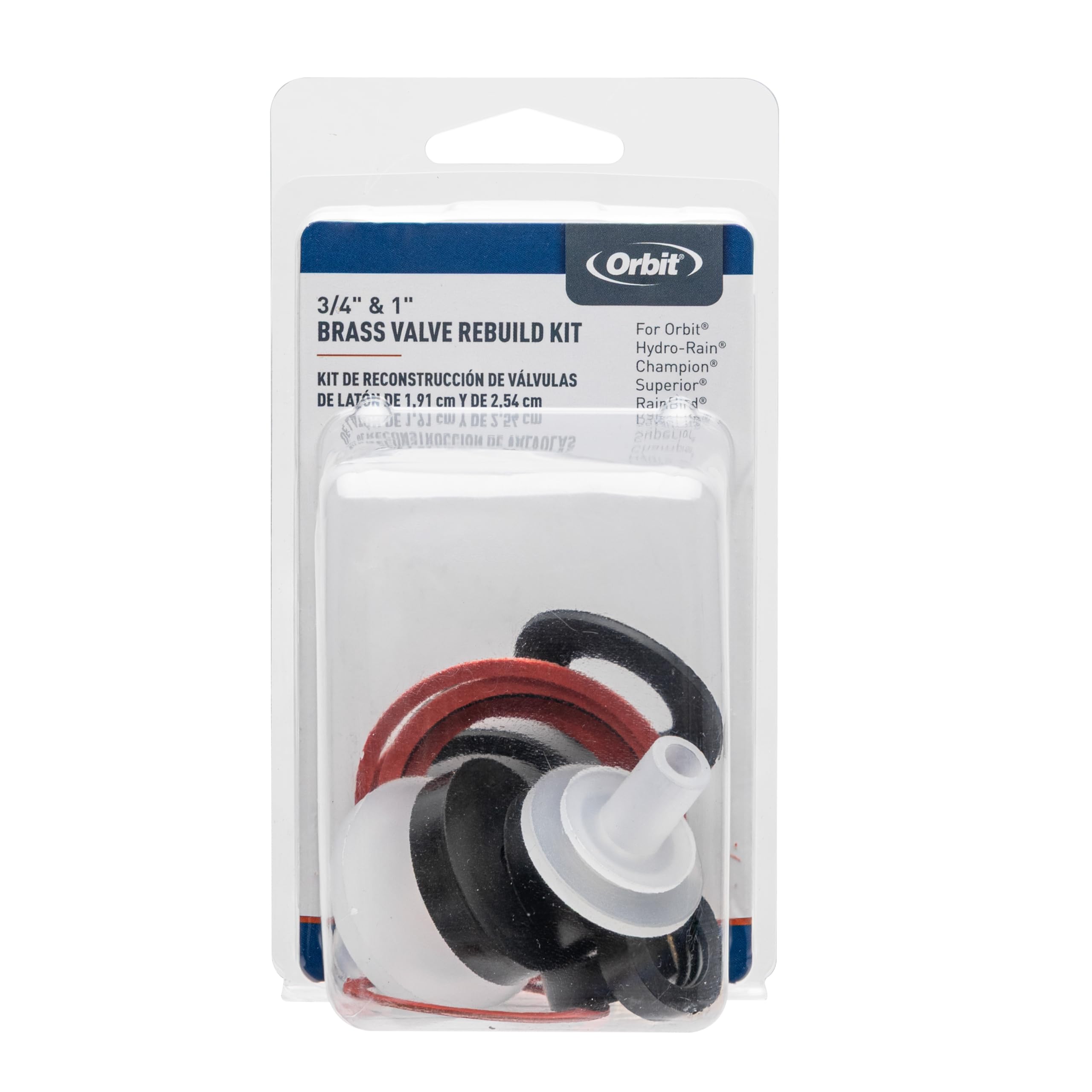
Image source: Bing (Web (fair-use with source credit))
Common Mistakes When Swapping a Sprinkler Valve Diaphragm
Most failed diaphragm repairs come from a handful of repeat mistakes. Knowing them upfront turns a frustrating afternoon into a clean, one-and-done fix.
Buying the wrong repair kit
This is the big one. The 570/580 and 2600 diaphragms look similar but won't seat correctly in the wrong body. A stretched, pinched, or visibly off-center rubber after reassembly almost always means a mismatched kit.
Always confirm the model number before you buy.
Overtightening the bonnet screws
The valve body is glass-filled polypropylene, strong but brittle when stressed. If you crank the four screws down hard, you'll crack the bonnet or strip the screw bosses. Snug and even is enough.
A criss-cross tightening pattern helps distribute pressure.
Forgetting to clear the bleed port
That tiny hole at the base of the diaphragm seat is the entire reason the valve opens and closes. If a grain of sand or a piece of old rubber is blocking it, the valve won't shut off. A quick poke with a pin or thin pick before you drop in the new diaphragm saves a second disassembly.
Losing or skipping the spring
The spring sits in the center of the diaphragm and pushes it against the seat. Without it, the rubber flops and won't seal. The springs in repair kits are often slightly different lengths, so use the one that came in your kit, not an old one off the bench.
Reassembling with debris inside
A single leaf, a clump of dirt, or a piece of the old diaphragm stuck on the seat will cause a slow leak that mimics a failed repair. Wipe the body, the bonnet interior, and the new diaphragm with a clean rag before you put it all back together.
Pressure Testing and Troubleshooting After the Repair
Once the valve is back together, the real test begins. A careful pressure check tells you within a minute whether the repair is sound, and helps you catch the few things that can still go wrong.
The right way to pressurize the line
Open the main shutoff slowly, all the way over about five seconds. A sudden rush of pressure can shock the new diaphragm and shift it out of place. Watch the repaired valve closely for the first 30 seconds.
Any drips from the bonnet or solenoid mean stop and recheck.
Manual test first, then automatic
Twist the solenoid a quarter turn to manually open the zone. Confirm water flows to the sprinklers, then release the solenoid. The zone should shut off within a couple of seconds.
If it does, run the same zone from the controller. The timer test confirms the solenoid is firing electrically, not just hydraulically.
What it means when things still go wrong
- Zone stays on after manual release: The bleed port is still clogged, or the diaphragm is misaligned. Reopen the valve and recheck both.
- Zone won't open at all: The solenoid isn't getting power, or it's failed. Test for 24V AC at the wires, then swap in a new solenoid if needed.
- Slow drip from the bonnet: Debris on the seat or a warped diaphragm. Disassemble, clean, and reinstall.
- Leak from the solenoid base: The solenoid O-ring is shot. Replace it, or add a wrap of Teflon tape on the threads.
How long should a good repair last?
A properly installed diaphragm in a residential system typically lasts 5 to 10 years, per aggregate user feedback and manufacturer service guidance. Hard water, high mineral content, and frequent pressure cycling shorten that. If your new diaphragm fails in under two years, look at your water quality or consider installing a filter ahead of the valve manifold.
Cost, Time, and When to Just Replace the Whole Valve
A diaphragm repair is one of the most cost-effective fixes in residential irrigation. The numbers almost always favor the repair, but there are a few cases where replacing the whole valve makes more sense.
Typical repair cost
The Orbit repair kit runs $5 to $12 at most home improvement retailers. Add a screwdriver and a rag, and you're done. If you hire a pro, the total job usually lands between $75 and $150, parts and labor.
A new Orbit valve costs about $15 to $30 for the part alone, so even a service call plus a full valve is usually under $200.
When the repair is the right call
- The valve body is in good shape with no cracks.
- The failure is recent, not a long-standing slow leak that may have rotted the seat.
- The rest of the system is under 10 years old, so the rest of the components are likely fine.
- You're comfortable with 20 to 30 minutes of work and a few basic tools.
When replacement is the smarter move
- The bonnet is cracked or the screw bosses are stripped.
- The valve body is leaking from the inlet or outlet ports, not the bonnet.
- The valve has been repaired multiple times and keeps failing.
- The manifold is old and you're upgrading to a new model anyway.
Quick decision guide
| Condition | Repair | Replace |
|---|---|---|
| Body in good shape | Yes | No |
| Cracked bonnet or body | No | Yes |
| First or second failure | Yes | No |
| Third failure in 3 years | No | Yes |
| Repair kit under $15 | Yes | Maybe |
| Replacing entire manifold | No | Yes |
If the body is sound and you can identify the model, repair. If the plastic is compromised or the valve is on its third failure, swap the whole unit. A new Orbit valve installs in the same time as a diaphragm repair, and you get a fresh solenoid and a fresh warranty.

Similar Posts